
What is the purpose of users?
Whether you are a brokerage firm, management company, or an independent landlord you may want to invite additional users to share your account. By adding users, you are generating their own log in information (Username and Password) and assigning permission levels.
To add a user, navigate to the Users tab on the upper right (next to the "Reports" tab). Click "Add User" button, fill in the info required and assign permissions.
What are module permissions?
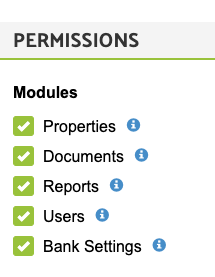
A module is either Properties, Documents, Users, etc. Simply check those modules that you would like your users to access. A good rule of thumb is to assign all modules to a user except "Users." By not assigning Users, the invited user will not be able to invite other users or re-assign other permission levels to him/herself.
Example: If you are inviting your attorney to verify your lease documents, the only module he needs is the "Documents" module. If you are inviting another leasing agent, he will need access to all modules except "Users."
What are property permissions?
Each property has a property owner and a property manager. If your property owner differs from the property manager and if you decide to share the executed documents (rental application, background check report, lease document, and rent collection data) in your LeaseRunner account you can give the owner permissions only to that specific property she owns.
By giving property permissions, you allow the user to review all executed lease documents, applicant and tenant information (e.g. rental applications, background check results, eviction results), and property information.
Users can be assigned the following permissions:
Comments
0 comments
Please sign in to leave a comment.